jev-review: AI Code Review for Git Diffs With Jev
jev-review reviews a Git diff or codebase with Jev and shows findings in a local dashboard. Setup steps, plus a JevStation API key to score diffs yourself.
 JevStation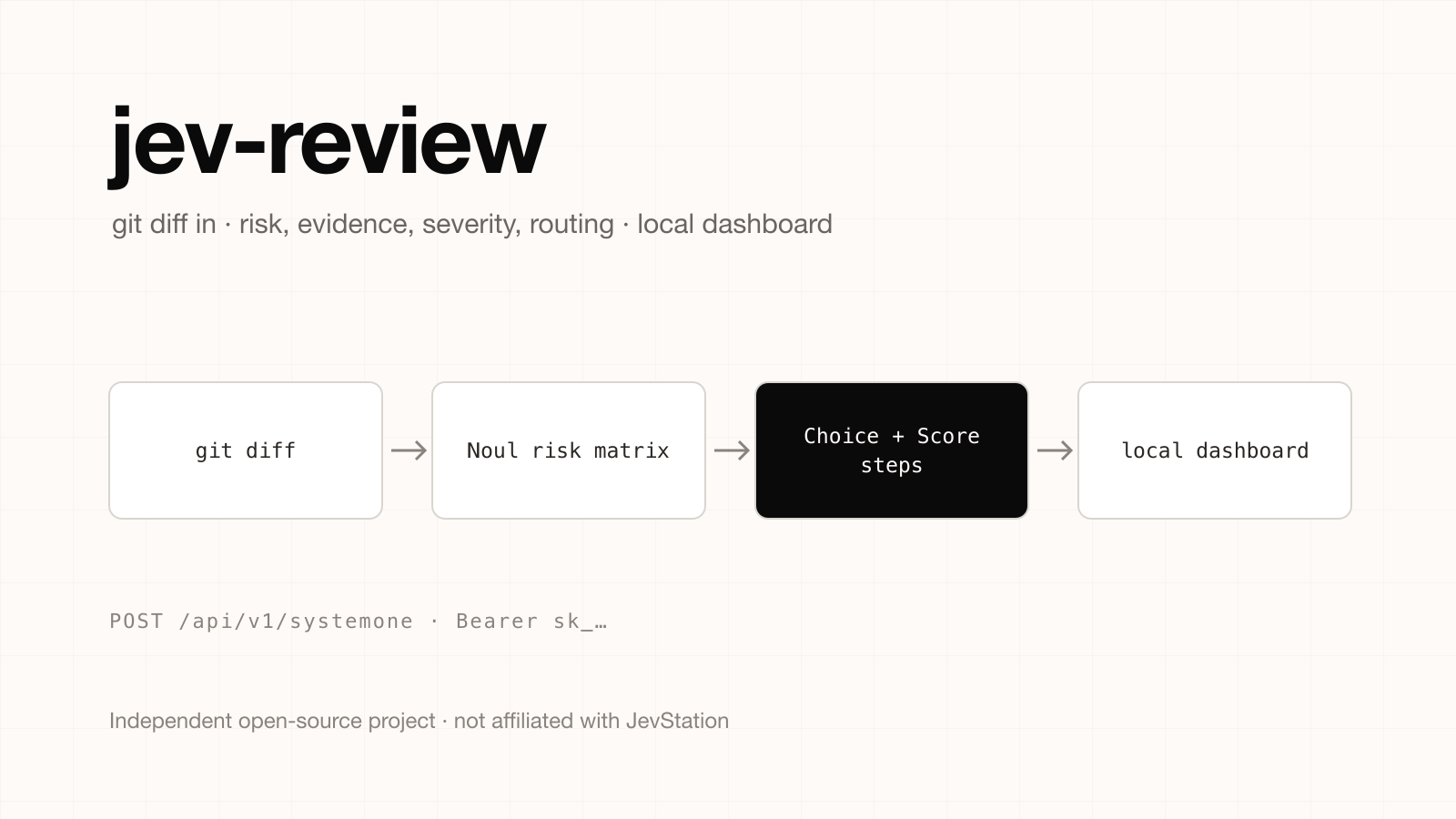
Independent project notice. JevStation is not affiliated with, endorsed by or sponsored by the author of jev-review. It is a separate open-source project (MIT licence) at github.com/devagrawal09/jev-review. We did not write it and do not maintain it. This guide summarises its public README as of 1 October 2026; check the repository for its current state.
jev-review is a small AI code review workflow built on Jev. It can review a Git diff or scan a whole codebase, follows the strongest signals through focused model calls, and shows the result in a quiet local dashboard. This guide explains the pipeline, the commands to run it, and how to use a JevStation API key to run the same kind of review question on a diff of your own.
What jev-review does
Instead of pasting a diff into a chat model and asking for "a review", jev-review splits the work into narrow steps. Per the README, the pipeline is:
- A Noul risk matrix gives an initial read on where risk sits.
- Choice and Score file profiles describe each changed file.
- Choice evidence selection picks the lines worth a closer look.
- Choice mechanism classification names how something could go wrong.
- Score severity rates how bad it would be.
- Conditional Choice reviewer routing decides which kind of reviewer should see it.
Orchestration and thresholds live in ordinary code. It screens for correctness, security, reliability, compatibility and test coverage, and it uses related tests as context when judging test gaps. The author describes it as an experiment: there is no compiler or static-analyser integration, and findings are prompts for a human, not proof of a defect.
This is a good illustration of what Choice, Score and Noul questions are for. Each step is a bounded classification, so each can be thresholded and logged, which is hard to do with free-form review prose.
Install and run jev-review
You need Node.js 24 or newer, Git and a TypeSafe API key:
npm install
cp .env.example .env     # add TYPESAFE_API_KEY
npm run review:changes:save -- /path/to/git/repository
npm run review:codebase:save -- /path/to/git/repository-or-package
npm run dashboard
The dashboard opens at http://127.0.0.1:4317. It binds to 127.0.0.1 and never serves your env files.
| Command | Purpose |
|---|---|
npm run review:changes -- <path> | Print a diff review as JSON |
npm run review:codebase -- <path> | Print a codebase scan as JSON |
npm run check | Typecheck, dependency-flow and dashboard checks |
The only environment variable is TYPESAFE_API_KEY. jev-review calls TypeSafe's API directly and its README documents no way to change the endpoint, so a JevStation key cannot be dropped into its .env.
Review a diff with a JevStation API key
If you want the same style of narrow, thresholded review inside your own CI job or pre-commit hook, call JevStation directly.
1. Generate the key
- Sign up for 200 free credits.
- Open /settings/apikeys, press Create Key, name it
ci-reviewand copy it. - Store it as a secret in your CI provider, or locally:
export JEVSTATION_API_KEY="sk_..."
- Test it for free with a
GET, which returns remaining credits:
curl https://jevstation.com/api/v1/systemone \
  -H "Authorization: Bearer $JEVSTATION_API_KEY"
2. Send a diff with review questions
Put the diff (or one file's hunk) in state. The three question types map straight onto jev-review's pipeline:
curl -X POST https://jevstation.com/api/v1/systemone \
  -H "Authorization: Bearer $JEVSTATION_API_KEY" \
  -H "Content-Type: application/json" \
  -d '{
    "state": {
      "file": "src/billing/refund.ts",
      "diff": "-  if (amount > balance) throw new Error(\"too much\");\n+  // validation moved to controller\n   await stripe.refunds.create({ amount });"
    },
    "questions": {
      "removes_validation": {
        "type": "noul",
        "instructions": "Does this change remove or weaken a safety check?"
      },
      "severity": {
        "type": "score",
        "instructions": "How severe would a defect in this change be in production?",
        "criteria": ["Cosmetic", "Minor", "Moderate", "Serious", "Critical"]
      },
      "category": {
        "type": "choice",
        "instructions": "Which kind of risk is most likely?",
        "criteria": {
          "correctness": "Wrong behaviour",
          "security": "Exposes data or permissions",
          "reliability": "Failures, retries or races",
          "compatibility": "Breaks callers or data",
          "test_gap": "Behaviour left untested",
          "none": "No notable risk"
        }
      }
    }
  }'
You get a noul probability, a severity score and a choice with probabilities and confidence. Per-question probabilities are the point: you can fail a build only when removes_validation is above 0.8 and severity is at least Serious, and send everything in between to a person.
3. A small pre-merge script
const res = await fetch('https://jevstation.com/api/v1/systemone', {
  method: 'POST',
  headers: {
    Authorization: `Bearer ${process.env.JEVSTATION_API_KEY}`,
    'Content-Type': 'application/json',
  },
  body: JSON.stringify({ state: { file, diff }, questions }),
});
if (!res.ok) throw new Error(`Jev ${res.status}`);
const { data } = await res.json();
const risky = data.answers.removes_validation.noul > 0.8;
console.log(risky ? 'needs human review' : 'ok', data.credits.remaining);
One diff of up to 8,000 characters with five questions or fewer costs 1 credit. A larger state or more questions costs 3. Failures are refunded. Keep each call to one file's hunk, which both fits the limit and gives better answers; Designing Questions Jev Can Answer explains why.
Limits, in the author's words and ours
- jev-review says its findings are prompts, not proof. The same holds for any model-based review, including your own JevStation calls.
- Jev gives probabilities, not written reasons. Use it to rank and route, and let a person write the explanation.
- Counting lines, matching test names and parsing the diff stay in code.
- Independent tests of Jev are few and small; see the benchmarks roundup before you trust a threshold.
For the closely related "is this output good" question, see Jev as a Judge and the Jev as a judge tool, which you can try without an account.
Get started
Create a free account, generate a key at /settings/apikeys, and run your first diff question in the playground. The API docs list every error code, and pricing covers one-time credit packs when you need more.
jev-review is independent of JevStation. Report bugs in its repository.