jev-seo: SEO Audit From One URL (Setup + API Key)
jev-seo crawls a site, runs 52 checks and asks Jev typed questions per page. Install it, then create a JevStation API key and score pages yourself.
 JevStation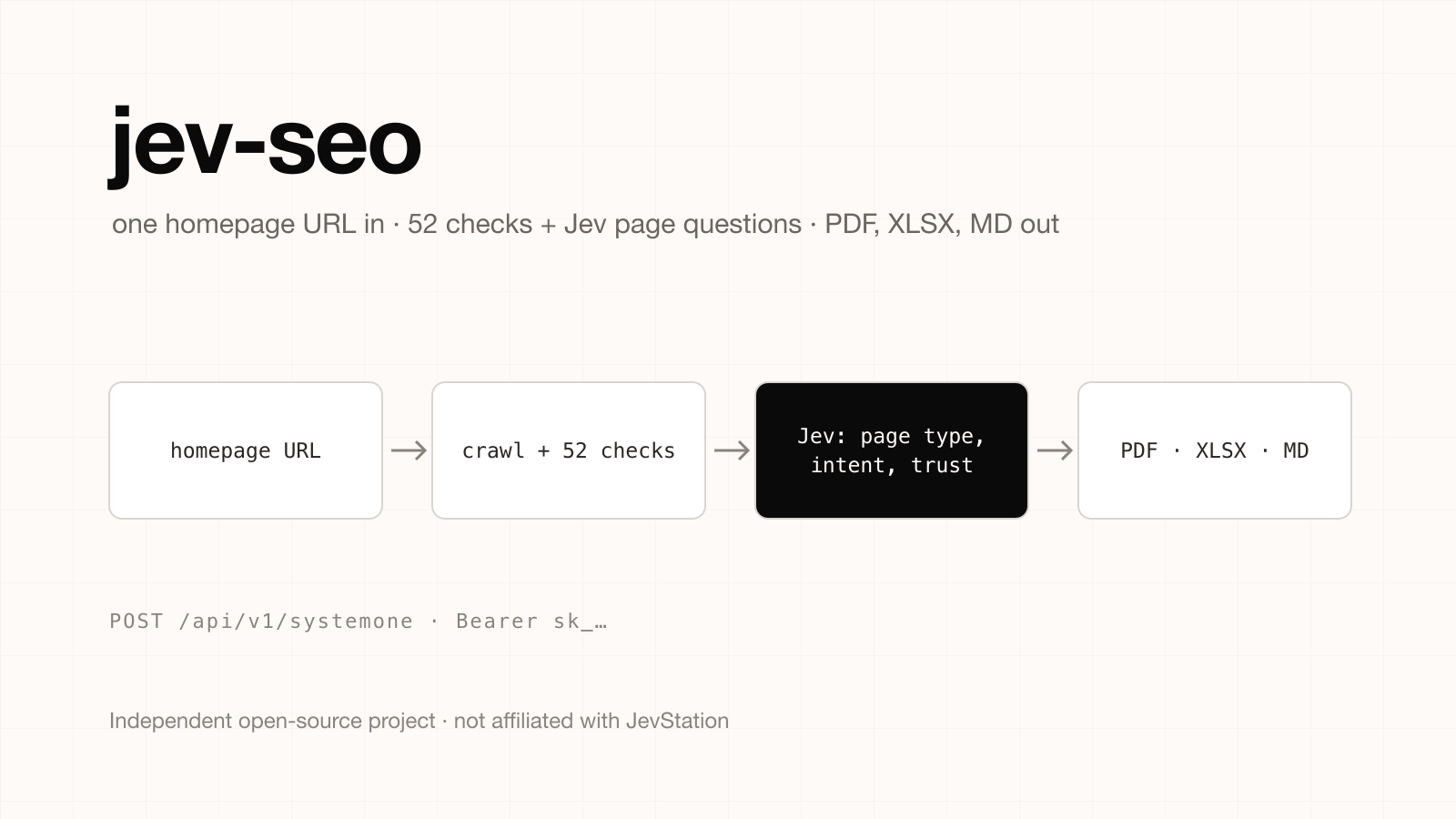
Independent project notice. JevStation is not affiliated with, endorsed by or sponsored by the author of jev-seo. It is a separate open-source project (MIT licence) at github.com/AgriciDaniel/jev-seo. We did not write it and do not maintain it. Everything below about the project comes from its public README as of 1 October 2026, so check the repository for its current state.
jev-seo is a live SEO audit tool that starts from a single homepage URL. It crawls the site, runs 52 deterministic checks tied to Google Search Central, measures Core Web Vitals, asks Jev typed questions about every page, ranks the fixes, and exports a PDF, an Excel action tracker and a Markdown report. This guide covers what it does, how to run it, and how to use your own JevStation API key to make the same kind of per-page judgement in your own scripts.
What jev-seo does
The split of work is the interesting part. According to the README, plain code does everything that has a right answer: robots.txt, sitemaps, redirects, soft-404 detection, llms.txt, internal links and the 52 rule checks. Jev is only asked the questions that need judgement, and code then scores and ranks the results.
- Crawl: a polite crawl with a default cap of 60 pages, optional JavaScript rendering through Playwright.
- Jev questions: 13 questions per page and 5 per site, plus competing-page pairs, covering things like page type, search intent, importance, helpfulness, trust and whether the title and meta description fit the page.
- Output: one
audit.jsonrendered into a designed PDF, an XLSX tracker and a Markdown report. --fullmode: adds DataForSEO rankings, keywords and backlinks.
The README quotes Jev at $0.042 per million input tokens, roughly $0.00015 per page, so a default-size site audit costs about a cent in model calls. A --full run is quoted at about $0.30 because of the DataForSEO data.
How to run jev-seo
You need Python 3.10 or newer. These are the commands from the README:
git clone https://github.com/AgriciDaniel/jev-seo.git
cd jev-seo
python3 -m venv .venv && . .venv/bin/activate
pip install -r requirements.txt
cp .env.example .env
bin/jevseo doctor
bin/jevseo run https://example.com
doctor checks your setup, and run produces the report folder. Other commands you will use:
bin/jevseo audit https://example.com --full     # adds DataForSEO data
bin/jevseo render jev-seo-reports/<dir>          # rebuild PDF/XLSX/MD from audit.json
bin/jevseo rescore jev-seo-reports/<dir>         # rescore without re-crawling
ln -s "$PWD" ~/.claude/skills/jev-seo            # use it as a Claude Code skill
Once the skill is linked, you can type /jev-seo https://example.com inside Claude Code. PDF output needs Pango (brew install pango on macOS). Budgets default to $0.25 for Jev (--jev-budget) and $1.00 for DataForSEO (--dfs-budget).
Which key does jev-seo want?
The .env file takes TYPESAFE_API_KEY, optionally PAGESPEED_API_KEY, and DATAFORSEO_USERNAME and DATAFORSEO_PASSWORD for --full. Without the TypeSafe key the audit still runs but marks the Jev sections as not assessed.
That variable name matters: jev-seo talks to TypeSafe's API directly, and its README does not document an option to point it at another endpoint. A JevStation key will not work inside jev-seo itself. What JevStation gives you is the same kind of Jev call, with an API key, a playground and a credit balance, for the places where you want to ask your own page-level questions.
Make the same judgement with a JevStation API key
Say you have a crawl of 400 URLs and want a quick triage of which pages look thin or mismatched, without running a full audit. This is the pattern jev-seo uses, expressed as a JevStation request.
1. Create an account and a key
- Sign up. New accounts get 200 free credits, with no card and no provider key.
- Open Settings → API Keys at /settings/apikeys and press Create Key. Name it something like
seo-triage. - Copy the key (it starts with
sk_) and keep it out of git:
export JEVSTATION_API_KEY="sk_..."
- Check the key without spending a credit. A
GETon the endpoint returns your remaining credits and rate limits:
curl https://jevstation.com/api/v1/systemone \
  -H "Authorization: Bearer $JEVSTATION_API_KEY"
2. Send a page and typed questions
The state is the text Jev should judge, and questions is a map of typed questions. Here a Choice labels the page, another Choice labels the search intent, a Noul checks the title, and a Score rates thin content:
curl -X POST https://jevstation.com/api/v1/systemone \
  -H "Authorization: Bearer $JEVSTATION_API_KEY" \
  -H "Content-Type: application/json" \
  -d '{
    "state": {
      "url": "https://example.com/pricing",
      "title": "Pricing | Example",
      "meta_description": "Plans for teams of every size.",
      "h1": "Simple pricing",
      "body_excerpt": "Free, Pro and Team plans. Start free. No card required."
    },
    "questions": {
      "page_type": {
        "type": "choice",
        "instructions": "What kind of page is this?",
        "criteria": {
          "home": "The site homepage",
          "product": "A product or feature page",
          "pricing": "A pricing or plans page",
          "article": "A blog post or guide",
          "other": "Anything else"
        }
      },
      "search_intent": {
        "type": "choice",
        "instructions": "What is the dominant search intent this page serves?",
        "criteria": {
          "informational": "Visitors want to learn something",
          "commercial": "Visitors are comparing options",
          "transactional": "Visitors want to buy or sign up",
          "navigational": "Visitors want a specific site or page"
        }
      },
      "title_fits": {
        "type": "noul",
        "instructions": "Does the title accurately describe the page content?"
      },
      "thin_content": {
        "type": "score",
        "instructions": "How thin is the content on this page?",
        "criteria": ["Substantial", "Adequate", "Light", "Thin", "Nearly empty"]
      }
    }
  }'
A successful response uses the envelope {"code": 0, "message": "ok", "data": {...}}. Under data.answers you get one answer per question id: a choice with probabilities and confidence, a score with a legend, and a noul probability between 0 and 1. data.credits shows what was charged and what remains.
3. Loop over your pages
Here is the same call from Python, written so a low-confidence answer is flagged rather than trusted:
import os, requests

API = "https://jevstation.com/api/v1/systemone"
HEADERS = {"Authorization": f"Bearer {os.environ['JEVSTATION_API_KEY']}"}

QUESTIONS = {
    "title_fits": {"type": "noul",
                   "instructions": "Does the title accurately describe the page content?"},
    "thin_content": {"type": "score",
                     "instructions": "How thin is the content on this page?",
                     "criteria": ["Substantial", "Adequate", "Light", "Thin", "Nearly empty"]},
}

def triage(page: dict) -> dict:
    r = requests.post(API, headers=HEADERS, json={"state": page, "questions": QUESTIONS}, timeout=30)
    r.raise_for_status()
    answers = r.json()["data"]["answers"]
    return {
        "url": page["url"],
        "title_fits": answers["title_fits"]["noul"],
        "thin": answers["thin_content"]["score"],
        "review": answers["title_fits"]["noul"] < 0.6,
    }
Each call costs 1 credit while the state is 8,000 characters or fewer and you ask five questions or fewer, and 3 credits above either limit. A failed evaluation is refunded. See what a Jev evaluation costs for the full rule.
4. Or skip the code and use Batch
If your pages are in a spreadsheet, the Batch page runs one saved question set over a CSV, TXT or JSONL file of up to 1,000 rows and exports the answers with probabilities as CSV. You can design and test the question set first in the playground.
When to use jev-seo and when to call Jev yourself
| You want | Use |
|---|---|
| A full audit with PDF, tracker, Core Web Vitals and ranked fixes | jev-seo, with a TypeSafe key as its README describes |
| A quick judgement on pages you already have | JevStation API, playground or Batch |
| Your own SEO tooling that needs page type or intent labels | JevStation API with your own question set |
| Judgement inside an AI agent | JevStation MCP server |
One caution applies to both. Jev gives probabilities, not written reasons, and it is weaker at counting and arithmetic, so keep word counts, link counts and status codes in code, which is exactly how jev-seo divides the work. Read Designing Questions Jev Can Answer before you write a larger question set.
Next steps
- Create your free account and make your first key at /settings/apikeys.
- Read the API docs for every field, error code and rate limit.
- Try a question set on a real page in the playground, then scale it with Batch.
- See pricing when the free credits run out: one-time packs, no subscription.
jev-seo is MIT-licensed and independent of JevStation. Star it or file issues at its repository, not with us.